Home All Apps
Sider App Icon
Coming Soon to the App Store

Sider

Your face answers before you do

Sider shows you one dilemma at a time. You answer by sliding toward your side — and because you never see the question coming, the front camera catches the real reaction.

App Store — Coming Soon
Coming Soon

Be the first to know

Join the waitlist and we'll send you one email when Sider hits the App Store. No spam, ever.

Get notified at launch

App Information

Quick facts about Sider for iOS

DeveloperCS42.org
PriceFree
CategoryEntertainment
CompatibilityiOS 17.0 or later
LanguagesEnglish
Age Rating13+
In-App PurchasesNone
AccountNot required
Data CollectedNone
Works OfflineYes — fully offline

About Sider

Not a quiz. A lean, a surprise, and a clip worth sending.

Most "this or that" games give you two buttons. Sider gives you a slider, because real answers aren't binary — 60/40 Messi says something very different from 100/0 Messi. How far you push it, how long you hesitate, and how many times you change your mind are all part of the answer.

Read more Show less

Questions stay hidden until the moment they appear, so what the camera captures is a genuine first reaction rather than a performance. When the session ends you get a video with the questions and your answers burned in, ready to send to the one person who'll argue with every single pick.

Key Features

🎚️

The Slider

Answer with a lean, not a tap. Haptics tick as you cross the middle, and slamming it all the way is its own kind of statement.

🎥

Reaction Video

Your session recorded with questions, answers, and a replay of your slider burned in — the hesitation included.

🎬

Three Ways to Play

Full video, voice-only over a backdrop, or no recording at all. Camera shy is a first-class option, not an afterthought.

🃏

1,575 Dilemmas

24 decks across 17 categories — food, football, film, travel, tech, moral mazes, and more. Many decks draw fresh matchups every run.

⚖️

The Fence Meter

The question that wrecked you, measured: changes of heart, seconds agonising, and how close to the middle you landed.

🛡️

Private by Default

No account, no server, no analytics. Recordings stay on your phone until you choose to share one.

Screenshots

Preview how Sider looks on iOS
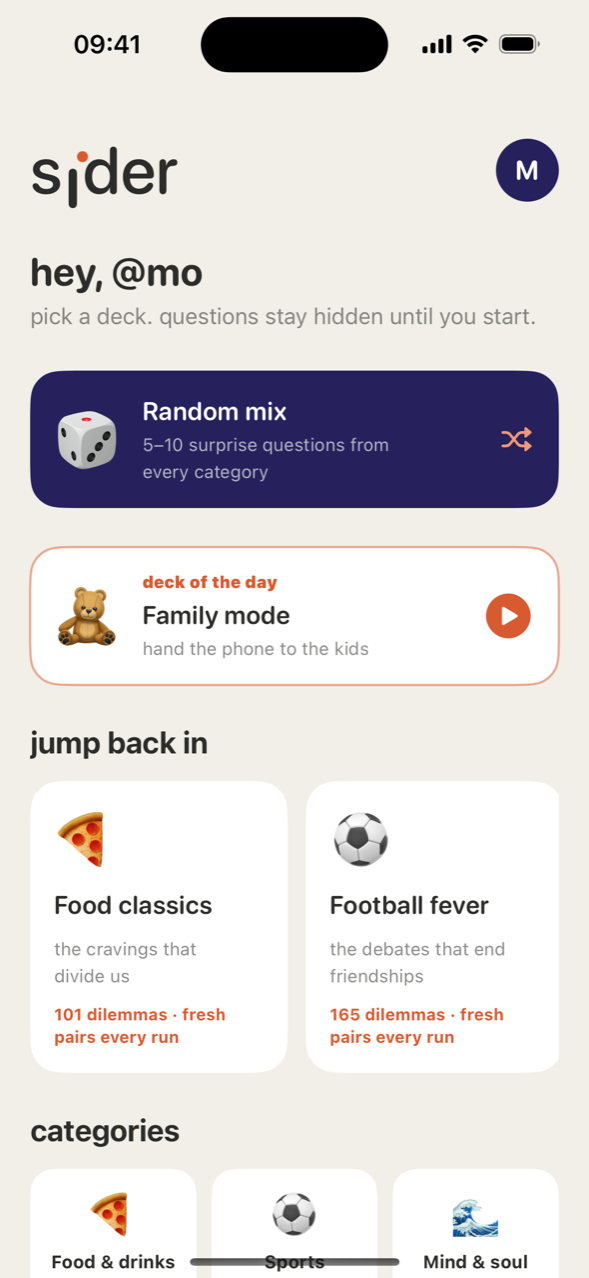
Sider home screen with a Random Mix card, a deck of the day, and recent decks including Food Classics and Football Fever.
Pick a Deck
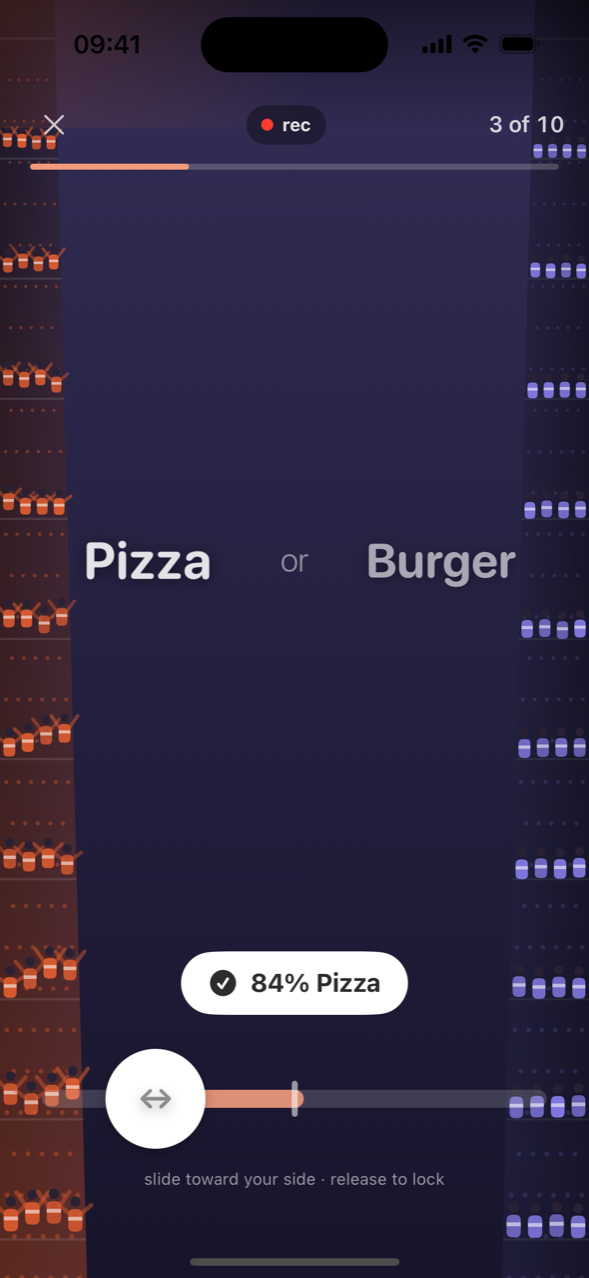
A live session recording question three of ten, Pizza or Burger, with the slider locked at 84 percent Pizza.
Answer with the Slider
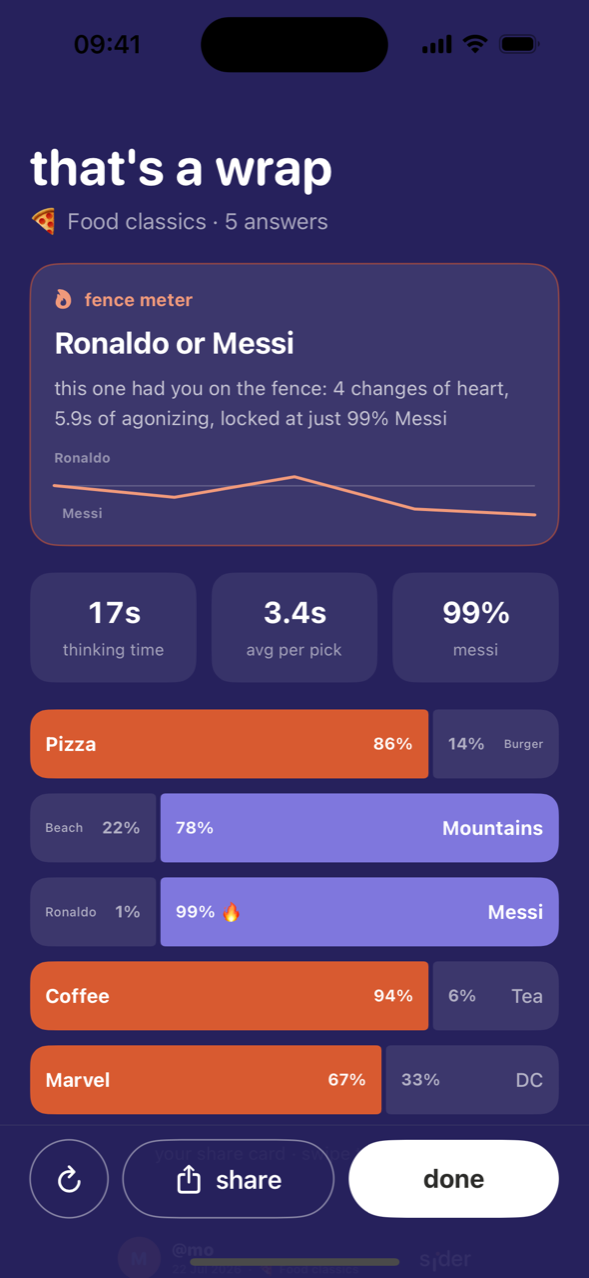
End of session results with the fence meter on Ronaldo or Messi, thinking time stats, and a split bar for every answer.
Your Results
A shareable session card showing picks, boldest answer, most torn question, and each dilemma as a split bar.
Share Card
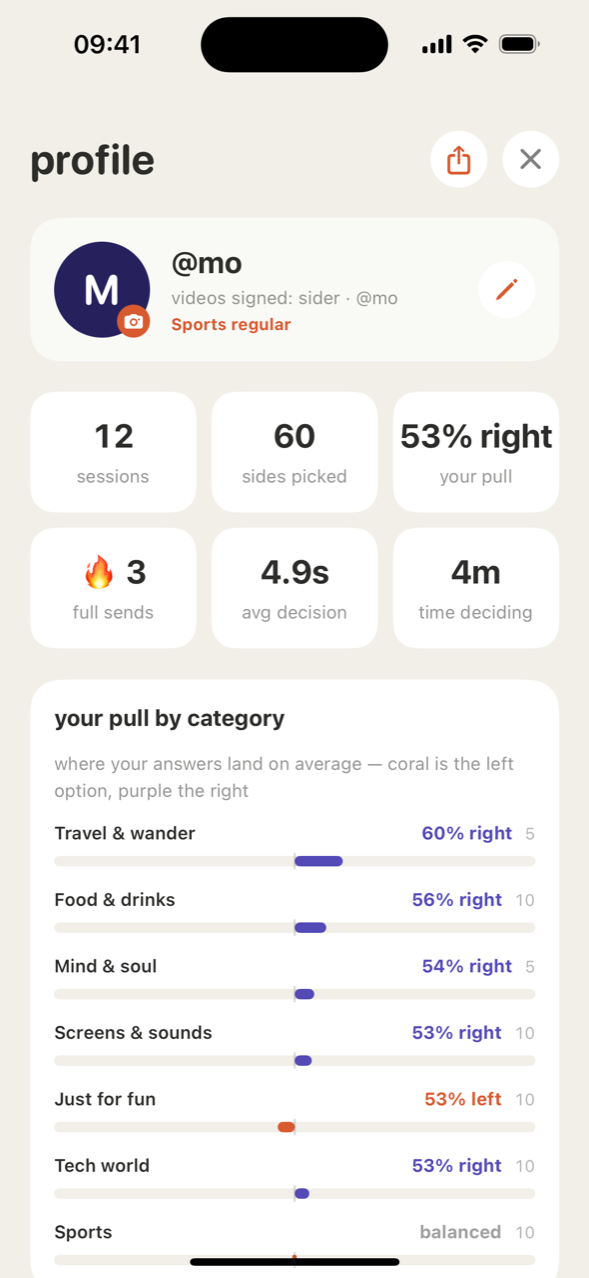
Profile screen with sessions, sides picked, full sends and average decision time, above a breakdown of your pull by category.
Your Profile

Terms & Conditions

Effective date: July 21, 2026 · Last updated: July 26, 2026

By using Sider you agree to use it for personal, non-commercial purposes. Your recordings are yours and stay on your device — you are responsible for what you record and share, including having permission from other people you record. The app is provided as-is, with no warranty. Read the full terms →

Read full terms Show less

1. Agreement

These terms apply to your use of the Sider iOS application ("the App"), published by CS42.org ("we", "us"). By installing or using the App you agree to them. If you do not agree, please delete the App.

2. Licence

We grant you a personal, non-exclusive, non-transferable licence to use the App on devices you own or control, in line with the App Store Terms of Service. We retain all rights not expressly granted.

3. Age Requirement

The App is rated 13+ and is not directed to children under 13. Some question decks touch on relationships and mildly provocative topics.

4. Your Content

Videos, audio, photographs, and answers you create with the App are yours. We claim no ownership of them and, because they are not transmitted to us, we have no access to them. You are responsible for what you record and for anything you choose to share.

5. Recording Other People

If you record another person, it is your responsibility to have their permission and to comply with the laws of your location on recording and sharing images and audio of others.

6. Acceptable Use

Do not use the App to create or distribute unlawful, harassing, hateful, or infringing material, or to impersonate anyone. Do not attempt to reverse engineer, decompile, or otherwise derive the source code of the App except where that restriction is prohibited by law.

7. Question Content

The dilemmas in the App are written for entertainment. They are opinions and prompts, not statements of fact, advice, or endorsement of any person, brand, team, or product named in them. Names of public figures, brands, and organisations are used nominatively to identify them and imply no affiliation or sponsorship.

8. Not Advice

Nothing in the App is medical, legal, financial, or psychological advice. Results, scores, and profile statistics are entertainment.

9. Your Device and Storage

Reaction videos are large. You are responsible for managing your device storage; the App provides tools to review and delete what it has stored. Deleting the App removes everything it kept on your device, which cannot then be recovered by us or by you.

10. Availability and Changes

The App is provided as-is. We may add, change, or remove features, decks, or questions at any time, and we may stop supporting the App.

11. No Warranty

To the fullest extent permitted by law, the App is provided without warranties of any kind, express or implied, including fitness for a particular purpose and uninterrupted or error-free operation.

12. Limitation of Liability

To the fullest extent permitted by law, we are not liable for indirect or consequential loss, or for loss of recordings or data, arising from your use of the App. Nothing here limits liability that cannot lawfully be limited.

13. Third-Party Services

Saving to Photos and sharing to other apps are handled by Apple and by whichever app you share into. Those services have their own terms and privacy policies.

14. Termination

You may stop using the App at any time by deleting it. This licence ends automatically if you breach these terms.

15. Governing Law

These terms are governed by the laws applicable at the developer's place of establishment, without regard to conflict-of-law rules.

16. Changes to Terms

We may update these terms. The effective date above will change when we do. Continued use after an update means you accept the revised terms.

17. Contact

If you have any questions about these terms, contact us at hello@cs42.org.

Last updated: July 26, 2026

Privacy Policy

Effective date: July 21, 2026 · Last updated: July 26, 2026

Sider has no accounts, no servers, and no analytics. It cannot send your data anywhere, because it contains no code that transmits anything. Recordings stay on your phone until you choose to share one. Read the full policy →

Read full privacy policy Show less

CS42.org ("we", "us", "our") built the Sider app as a free application. This section explains what the App stores, where it stores it, and how to delete it.

1. What We Collect

Nothing. We operate no servers and receive no data from the App. We cannot see your videos, your answers, your profile, or how often you play.

2. What the App Stores on Your Device

  • Reaction videos and audio you record during a session.
  • Your answers — the slider position, how long you took, and how many times you changed direction.
  • Profile details you choose to enter — a display name, optional social handles, an optional profile photo, and optionally a birth year, a birthday, and a country.
  • Preferences such as your recording mode and sound settings.

All of it lives in the App's own storage on your iPhone. None of it is transmitted.

3. Camera and Microphone

The camera and microphone are used only while a session is actually recording, and only in the recording modes you choose. In "audio only" mode the camera is not used at all. In "no recording" mode neither is used. Footage is written directly to your device.

4. Photos

When you export a reaction video, the App asks iOS to save it to your Photos library. It requests permission to read your Photos library only if you later ask it to play back a video that you chose not to keep a second copy of inside the App. The App does not browse, index, or upload your photo library.

5. Sharing Is Always Your Choice

Nothing is shared automatically. When you tap share, iOS hands the file to whichever app you pick, and from that point that app's privacy policy applies. A video you post publicly is public — please think about who else is in frame.

6. No Tracking, No Ads, No Third-Party SDKs

The App contains no advertising, no analytics, no crash reporting services, no social media SDKs, and no tracking identifiers. It does not use the Advertising Identifier and does not track you across apps or websites.

7. Children's Privacy

The App is rated 13+ and is not directed to children under 13. Since we collect no data at all, we hold no personal information about anyone, including children.

8. Your Control and Your Rights

Because your data never leaves your device, you have complete control of it at all times:

  • Delete an individual video, or a whole session, from your history inside the App.
  • Delete every stored video at once from the storage section of your profile.
  • Clear any profile field, including your photo, birth year, birthday, and country.
  • Delete the App to remove everything it has stored.

There is no request to make of us, because there is nothing held by us to disclose, correct, or erase.

9. Data Retention

The App keeps what you record until you delete it or delete the App. We retain nothing, for any period.

10. Security

Your recordings are protected by your device's own security — your passcode, Face ID or Touch ID, and iOS app sandboxing. Keep your device updated and locked.

11. Backups

Reaction videos kept inside the App are excluded from iCloud device backup, because exports already go to your Photos library and video is large. Anything saved to Photos follows your own iCloud Photos settings.

12. International Users

No data is transferred anywhere, so no international data transfer takes place.

13. Future Features

We are considering an optional feature that would compare your answers with other players. It does not exist in the App today. If it is ever released it will be strictly opt-in, off by default, explained clearly before you turn it on, and this policy and the App Store privacy labels will be updated before any data is sent anywhere.

14. Changes to This Policy

If this policy changes, the effective date above changes with it, and material changes will be described in the App's release notes.

15. Contact Us

If you have any questions or concerns about this Privacy Policy, contact us at hello@cs42.org.

Last updated: July 26, 2026

Support

Need help with Sider?

If you encounter any issues, have a deck idea, or just want to say hello, reach out to us — telling us your iPhone model and iOS version makes it much faster to help:

View FAQ Hide FAQ

Do I have to let it record me?

No. Sider has three recording modes and you can switch between them on the screen before every session: full video, voice only over a backdrop, or no recording at all. The game plays exactly the same in all three.

Do I need an account?

There isn't one. No sign-up, no email, no password. Open the app and play.

Where do my videos go?

They stay on your iPhone. When you export one, it is saved to your Photos library and the app asks whether you also want to keep a copy inside Sider so you can replay it from your history. Nothing is uploaded anywhere.

How do I free up space?

Open your profile and find the storage section. It shows exactly how much space Sider is using and lets you clean up leftover working files or delete every stored video at once. To remove a single one, swipe its row in your history and choose Video — that keeps the session and your answers and deletes only the clip.

Can I delete just the video but keep my answers?

Yes. Swiping a history row offers two actions: delete the whole session, or delete only the video. Your answers, stats, and share card survive the second one.

My reaction video didn't save

Check that Sider has camera and microphone permission in Settings → Privacy, and that your device has free space — a session ending with a full disk can lose the recording. If a session is interrupted by a phone call it ends gracefully and keeps the answers recorded up to that point.

Why is there a black box with numbers over the camera?

That is iOS's own Graphics HUD, not part of Sider. Turn it off in Settings → Developer → Graphics HUD. It only appears on devices with Developer Mode enabled.

Can I suggest a question or a deck?

Please do — that is genuinely the most useful email we get. Send it to hello@cs42.org.

We typically respond within 48 hours.