
PunchTrack
Audio-powered punch counterTurn your iPhone into a coach for solo heavy-bag boxing. No wearables, no straps, no audio recording, train offline, then sync and compete with friends when you want to.
Download on the App StorePunchTrack is live on the App Store
Thanks to everyone who joined the waitlist. The wait is over. PunchTrack: Boxing Tracker is out now for iPhone. Free, no ads, and no in-app purchases.
Free · iOS 16.0 or later
View on the App StoreApp Information
Quick facts about PunchTrack for iOS
About PunchTrack
What is PunchTrack?
PunchTrack turns your iPhone into a coach for solo heavy-bag boxing. Place your phone nearby, start training, and the app counts every punch in real time using only the microphone, no wearables and no audio recording. Train fully offline, or create a free account to back up your progress, follow friends, and climb the leaderboards.
Read more Show less
PunchTrack listens for the percussive thud of a punch landing on the bag. A bandpass filter isolates the low-frequency impact while ignoring music, footsteps, and chatter. An adaptive noise floor learns your room, and the detector classifies each punch into Normal, Strong, or Power tiers, so you can track whether you are working speed, technique, or knockout power. Your own music keeps playing on your headphones the whole time.
Gym mode takes that further for rooms that are genuinely loud. It listens across two frequency bands and only counts a hit when both agree, re-learns the noise floor continuously as you train, and works out the tempo of whatever music is playing so it can discount hits that fall on the beat. The original detector still ships as Classic if it suits your bag better.
Key Features
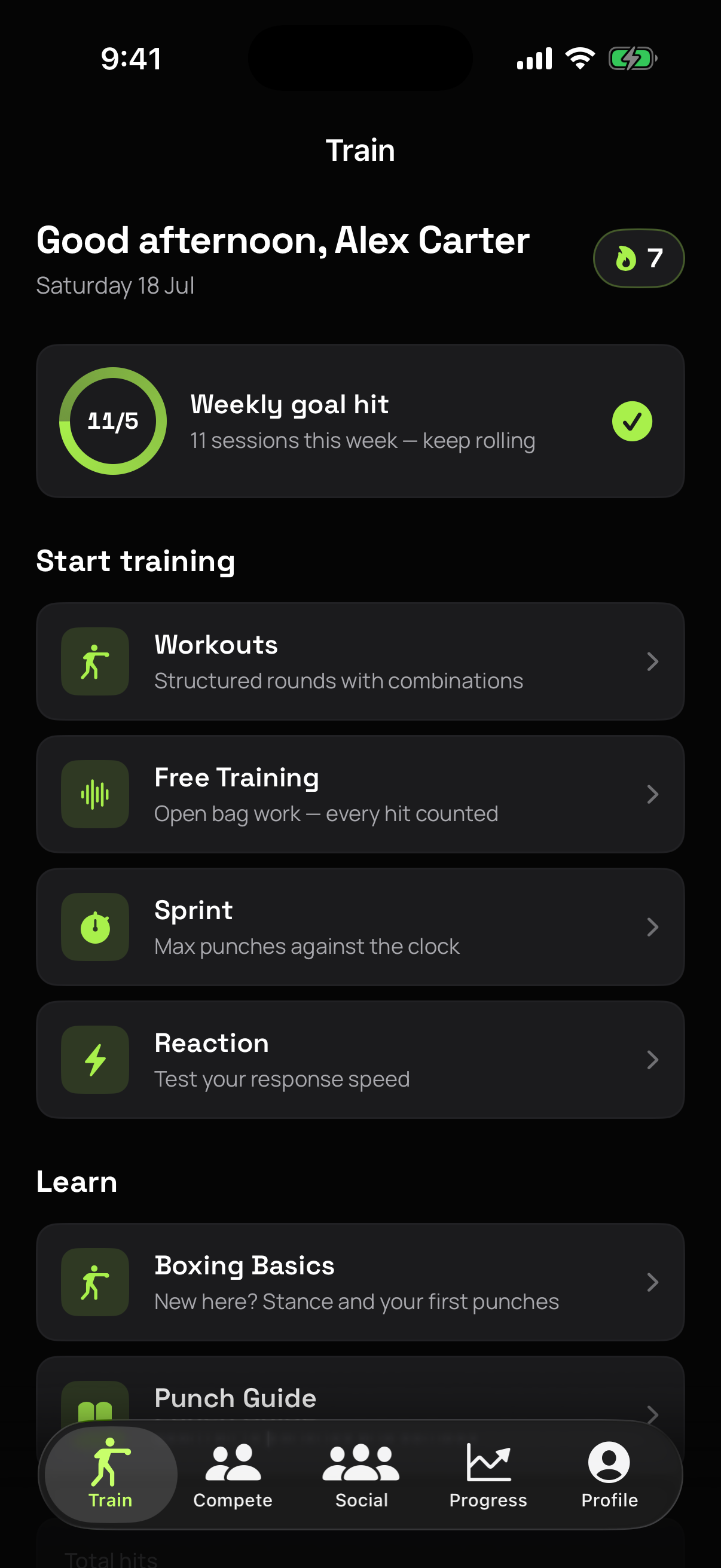
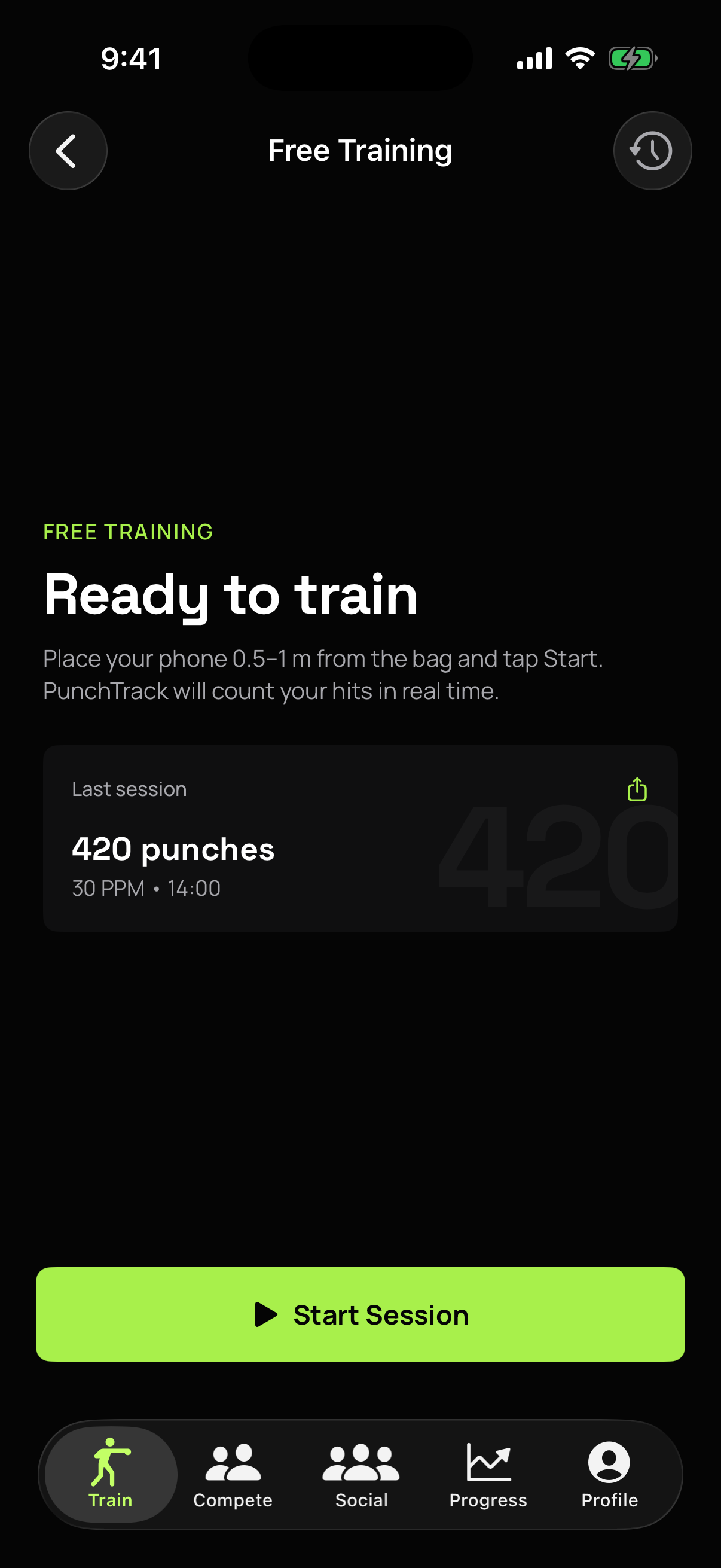
Free Training
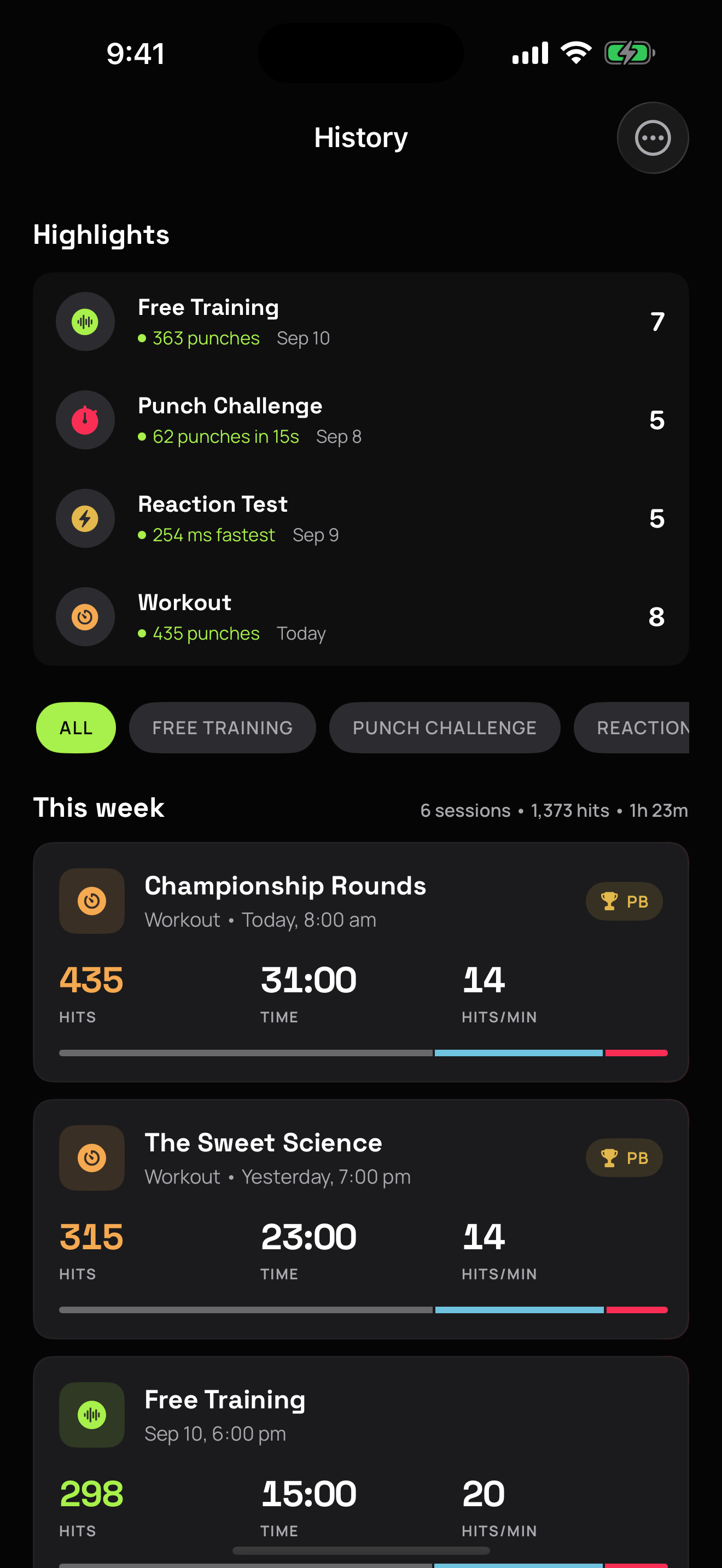
Start a session, hit the bag, and see live punch count, hits per minute, and a power breakdown the moment your round ends.
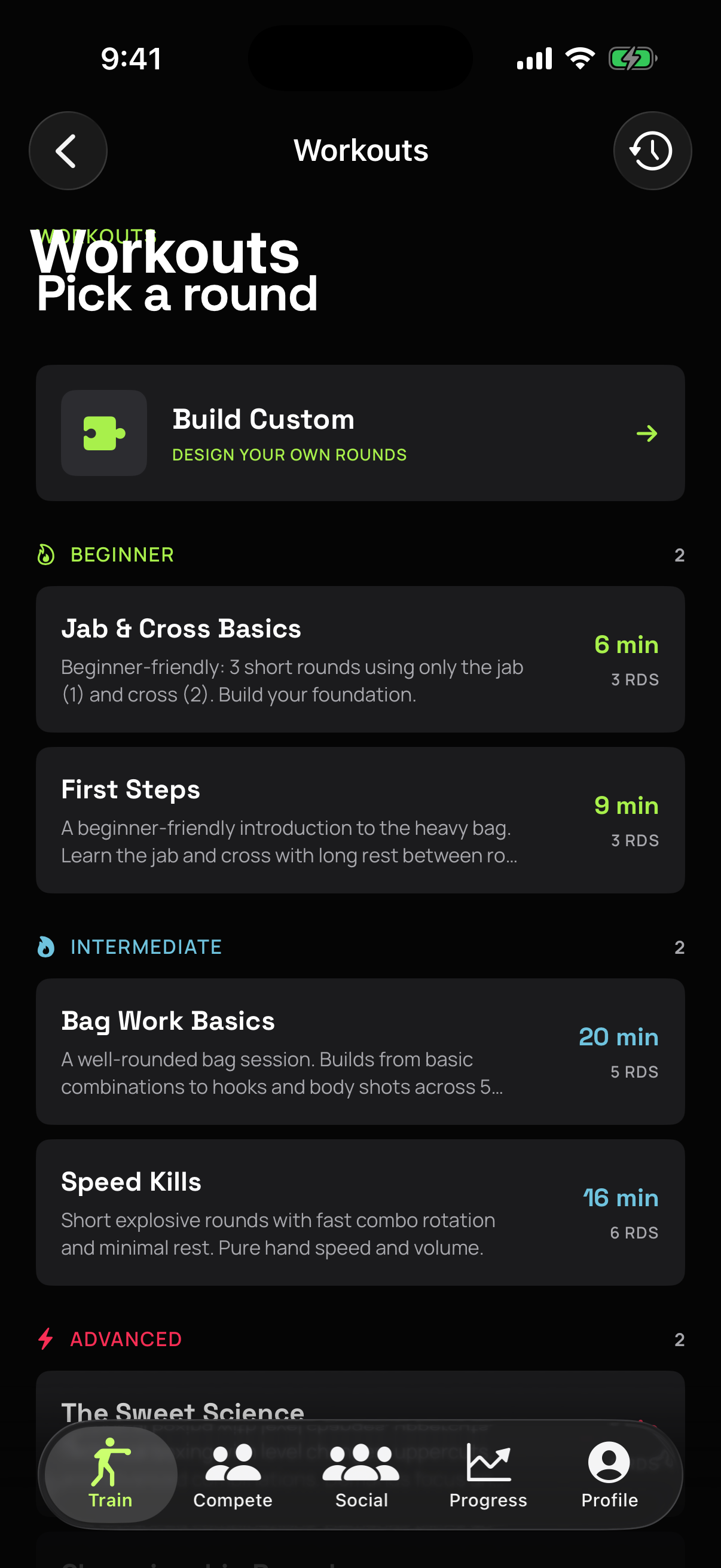
Guided Workouts
Six coached routines from beginner to brutal, or build your own. Each round is timed, with bell cues and spoken combination callouts.
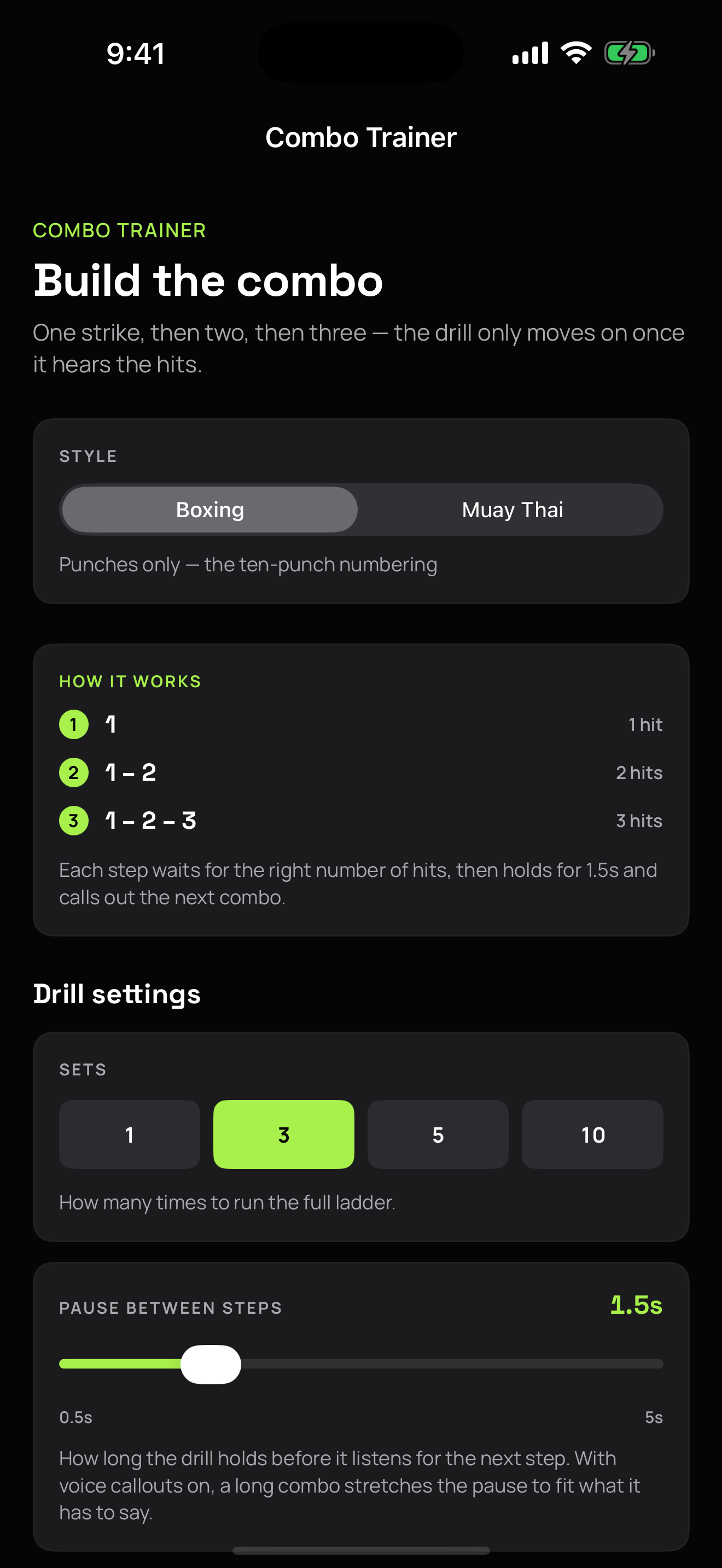
Combo Trainer
A ladder drill that builds combinations one punch at a time, and only moves on when it hears you land the full combo. Boxing, or Muay Thai with elbows, knees, and kicks.
Challenges & 1v1
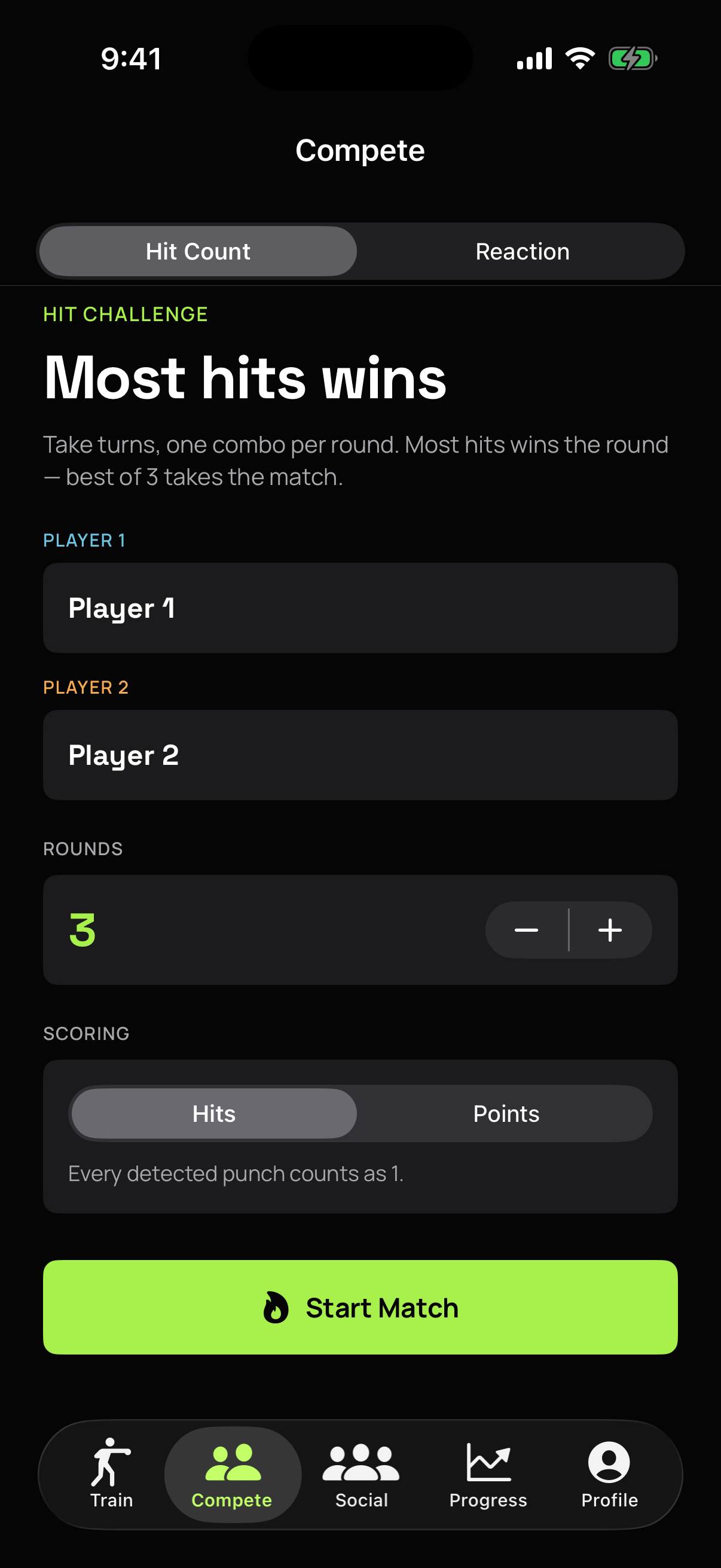
Race the clock in timed punch challenges, test your reflexes in reaction drills, or pass the phone for a round-by-round 1v1 match.
Social & Leaderboards
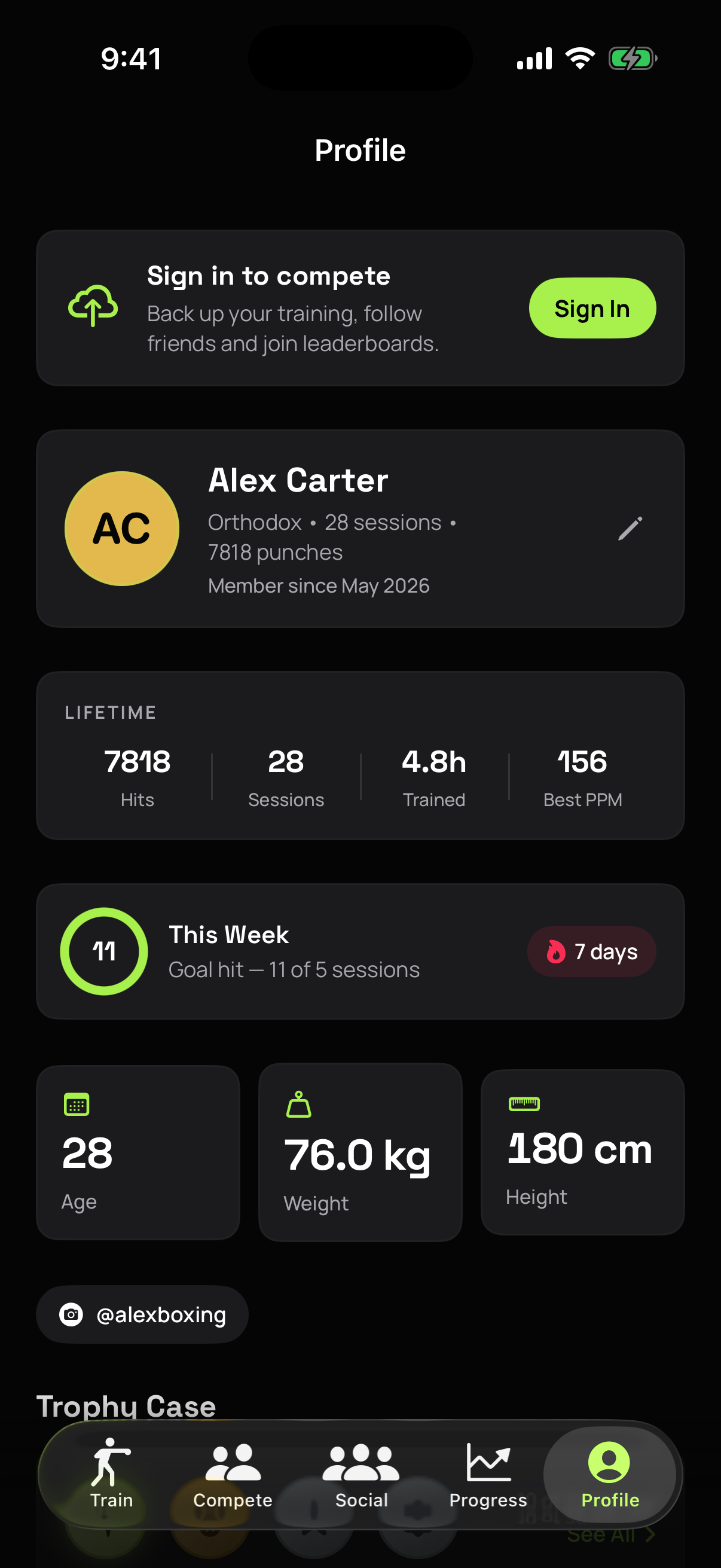
Create a fighter card, follow friends, and battle for the weekly and all-time top spots, globally, in your country, or among people you follow.
Progress & Achievements
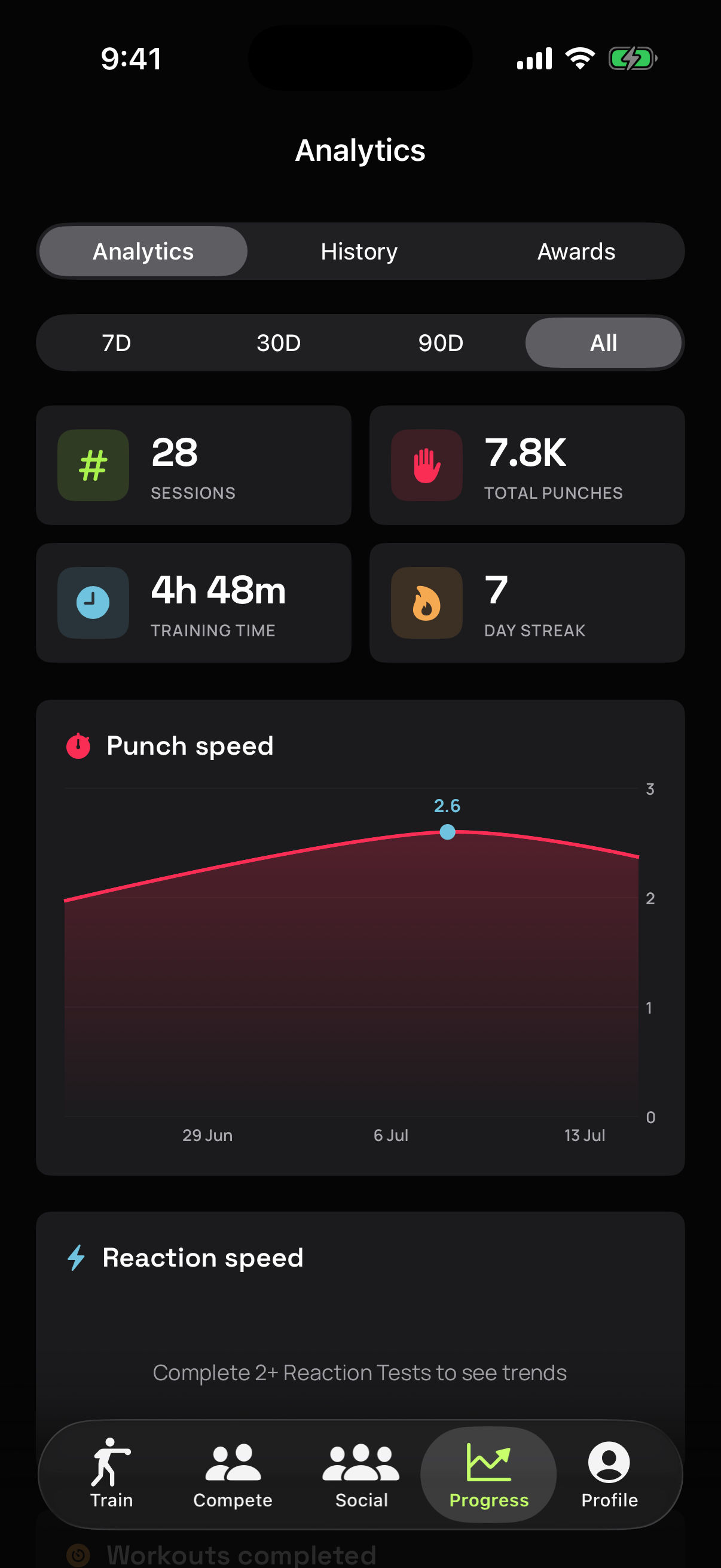
Weekly activity rings for sessions, hits, and minutes. Charts for punch volume, cadence, and reaction times, a seven-day trend card, a training-log calendar, streaks, and a trophy case of unlockable achievements.
Never Records
The mic is a sensor, not a recorder. Audio is analyzed in memory and discarded. Train with no account at all, or sync with one and stay in control of what's shared.
More
- Cloud backup & sync. An optional free account keeps your profiles, sessions, and settings safe and in sync across devices.
- Share cards, turn any session into a poster-grade card (eleven styles, with or without a transparent background) and share it to your story or save it to Photos.
- Apple Health, optionally save workouts and estimated calories to the Health app (write-only).
- Boxing Basics guide, animated stance, guard, and punch walkthroughs for first-time boxers.
- Train to your own music. Detection runs on the phone's mic while Spotify, Apple Music, or a podcast keeps playing on your headphones. Bell cues and combo callouts mix over the top instead of pausing it.
- Mic check before you start, every workout offers a quick sensitivity test: throw a few hits, watch them register, nudge the slider if needed, or skip straight to the bell.
- Gym mode detection, a detector built for loud rooms. It listens across two frequency bands and only counts a hit when both agree, learns the room's noise floor while you train, and locks onto the music's beat so it can ignore it. If your bag suits the original detector better, Classic is one tap away under Profile → Sensor Calibration.
- Smart calibration, a 30-second guided test fine-tunes the detector to your room and bag. Optional. Defaults work for most setups. Find it under Profile → Sensor Calibration.
- Trash Talk (Hype Mode). When you go quiet on the bag, the app fires a spoken taunt to push you back into it. On by default; turn it off or change the silence threshold under Profile → Trash Talk.
- Orthodox or Southpaw, every workout, drill, and bag-strike-zone visualization adapts to your stance.
- Four themes, Kinetic and Midnight for dark, Daylight and Coastal for light, plus 5 app icon variants: Forest, Sunset, Midnight, Gold, and Mono.
- Metric or imperial, weights and heights in the units you think in.
- Training reminders, optional daily streak nudge and Sunday summary, scheduled locally on your device.
- Backup file export. Take your data with you as a portable backup file, account or not.
Screenshots
Preview how PunchTrack looks on iOS
Terms & Conditions
Effective date: May 2, 2026 · Last updated: August 22, 2026
By using PunchTrack you agree to use it for personal, non-commercial purposes and to follow the community rules that apply to the social features (accounts only. Your fighter card is discoverable by default and can be switched off at any time in Profile). The app is provided as-is, with no warranty, and is not a medical device or professional training tool. Read the full terms →
Read full terms Show less
1. Acceptance of Terms
By downloading, installing, or using the PunchTrack mobile application ("the App"), you agree to be bound by these Terms and Conditions. If you do not agree, please do not use the App.
2. Description of Service
PunchTrack is a free boxing training application that uses your iPhone's microphone to detect and count punches during heavy-bag training sessions. The App also provides guided workouts, a custom workout builder, timed punch challenges, 1v1 matches, reaction drills, training analytics, achievements, shareable session cards, and an optional spoken "Trash Talk" mode that plays gym-style taunts at you when you stop punching. Optionally, you can create a free account to back up and sync your training data to the cloud and to use the social features: public fighter profiles, following other athletes, and leaderboards. The App is provided by CS42.org ("we", "us", "our").
3. Accounts
An account is optional. The App's training features work without one. If you create an account (with email and password, or Sign in with Apple):
- You must provide accurate information and keep your credentials secure. You are responsible for all activity under your account.
- You must be at least 13 years old (or the minimum age required in your country) to create an account and use the social features.
- Your username is a unique handle. Usernames that impersonate others, infringe trademarks, or are offensive may be reclaimed or reset by us.
- You may delete your account at any time in the app (Profile → Account → Delete Account), which permanently removes your cloud data.
4. User Content & Community Rules
The social features apply to accounts only; without an account you have no public presence. When you create an account and choose a username, your fighter card is discoverable by default to other signed-in users. The app states this on the username screen, and Profile → Discoverability turns it off at any time, removing your card immediately. Recent session summaries and your age, weight, and height are separately opt-in and off by default.
Your fighter card may include your display name, username, profile photo, country flags, social media handles, training statistics, and (if you enable it) recent session summaries. You retain ownership of this content and grant us a limited licence to host and display it to other users within the App; that licence ends when you remove the content, turn off discoverability, or delete your account. When using the social features you agree not to:
- Impersonate any person or entity, or misrepresent your identity.
- Publish content that is unlawful, hateful, harassing, sexually explicit, or otherwise offensive, including in usernames, display names, and profile photos.
- Manipulate leaderboards or statistics through falsified training data or tampering with the App.
- Harass other users. You can block or report any user from their profile; we review reports and may remove content or accounts.
Zero tolerance for objectionable content and abusive users. There is no tolerance for objectionable, abusive, or illegal content or behaviour on PunchTrack. We may remove content, reset usernames, and suspend or terminate accounts that violate these rules, at our discretion and without notice, in order to protect other users.
Because PunchTrack lets you publish a fighter card that other users can see, we provide the following safeguards:
- Filter. You can block any user from their profile. A blocked user is hidden from you everywhere in the App, and you stop following one another.
- Report. Every profile has a report action with a reason (spam, harassment, inappropriate content, impersonation, or other). Reporting a user also blocks them. Reports are delivered to a private moderation queue that we review.
- We act on reports. We aim to act on valid reports of objectionable content or abusive users within 24 hours, by removing the offending content and ejecting the user who provided it.
- Contact us. You can reach us about any content or user at hello@cs42.org.
5. Cloud Services
Cloud backup, sync, and social features depend on network connectivity and third-party infrastructure (Firebase). We aim for high availability but do not guarantee that these services will be uninterrupted or error-free, and we may modify, suspend, or discontinue them with reasonable notice. Your training data remains available locally on your device, and you can export a backup file from the app at any time.
6. Microphone Usage
PunchTrack requires microphone access to function. The microphone is used solely to detect punch impact sounds in real time. No audio is recorded, saved to disk, or transmitted from your device. The microphone stream is processed entirely in memory and discarded immediately. You may revoke microphone access at any time in iOS Settings, but the core functionality of the App will be unavailable without it.
7. Physical Activity Disclaimer
PunchTrack is designed for use during physical exercise. By using the App, you acknowledge that:
- You are voluntarily participating in physical activity and assume all risk of injury.
- You should consult a physician before beginning any new exercise programme.
- The App does not replace professional coaching, medical advice, or supervision.
- Punch counts, power classifications, and calorie estimates are approximations and should not be relied upon as precise measurements.
8. Usage Rights
We grant you a limited, non-exclusive, non-transferable, revocable licence to use the App for personal, non-commercial purposes on any Apple device that you own or control, subject to the Apple Media Services Terms and Conditions.
9. Intellectual Property
All content within the App, including but not limited to visual designs, logos, icons, animations, workout routines, and code, is the property of CS42.org or its licensors and is protected by applicable intellectual property laws. You may not reproduce, distribute, modify, or create derivative works from any App content without prior written consent.
10. User Conduct
- You shall not reverse-engineer, decompile, or disassemble the App.
- You shall not use the App for any unlawful purpose.
- You shall not attempt to gain unauthorized access to the App's systems, other users' accounts, or our cloud infrastructure.
- You shall not access the service through automated means or scrape user data.
- You shall not distribute or make the App available over a network where it could be used by multiple devices at the same time.
11. Disclaimers
The App is provided "as is" without warranty of any kind, either express or implied. We do not warrant that the App will be uninterrupted, error-free, or free of harmful components. PunchTrack is not a medical device, professional training tool, or diagnostic instrument. It is not intended to diagnose, treat, cure, or prevent any medical condition, nor to replace qualified coaching or medical advice.
12. Limitation of Liability
To the fullest extent permitted by law, CS42.org shall not be liable for any indirect, incidental, special, consequential, or punitive damages, including but not limited to loss of data, profits, or personal injury, arising out of your use of the App. Your use of PunchTrack during physical activity is at your own risk.
13. Changes to Terms
We reserve the right to modify these terms at any time. Changes will be posted within the App or on this page. Your continued use of the App after such changes constitutes your acceptance of the revised terms.
14. Termination
We may terminate or suspend your access to the App or your account at any time, without prior notice, for conduct that we believe violates these terms or is harmful to other users or us. You may stop using the App at any time and may delete your account and data from within the app.
15. Governing Law
These terms shall be governed by and construed in accordance with applicable laws, without regard to conflict-of-law principles.
16. Contact
If you have any questions about these terms, contact us at hello@cs42.org.
Last updated: August 22, 2026
Privacy Policy
Effective date: May 2, 2026 · Last updated: August 22, 2026
The microphone never records. Use PunchTrack entirely without an account and your data never leaves your device (no public presence at all. Create an optional free account and your training data is backed up to our cloud for sync, and your fighter card is discoverable by default so friends can find you) one tap in Profile turns it off, and session details, age, weight, and height stay private unless you switch them on. No ads, no third-party analytics, no selling data. Read the full policy →
Read full privacy policy Show less
CS42.org ("we", "us", "our") built the PunchTrack app as a free application. This section explains what data the App handles, where it goes, and the controls you have over it.
1. Two Ways to Use PunchTrack
- Without an account. Everything (profiles, sessions, statistics, settings) is stored only on your device. Nothing is sent to our servers, and we collect no personal data at all.
- With a free account. Sign up with email and password, or Sign in with Apple. Your training data is then backed up and synced to our cloud, and you can take part in the social features. An account is always optional. The training features work fully offline either way.
2. Information We Collect (Account Users Only)
- Account data. Your email address and chosen unique username. Passwords are handled by Firebase Authentication; we never see or store your plain-text password.
- Fighter profiles, name, stance, and optional fields you choose to fill in: gender, date of birth, weight, height, nationality, country of residence, Instagram/TikTok handles, profile photo.
- Training data, session records (type, date, duration, punch counts, hits per minute, power tiers) and reaction-drill statistics.
- App settings, preferences such as units and appearance, so they follow you across devices.
3. Social Features & What Other Users Can See
Accounts only. Without an account you have no public presence. Once you choose a username, a public fighter card is published for your account and is discoverable by default: username, display name, profile photo, country flags, social handles (if added), headline training stats, and the athletes you follow. The app says so on the username screen, and Profile → Discoverability switches it off at any time, deleting the card immediately. Recent session summaries and your age, weight, and height are off by default, each with its own toggle. Fighter cards are visible only to signed-in PunchTrack users, not on the open web. You can block and report other users.
4. How the Microphone Is Used
- When you start a session, the App opens a real-time audio tap on the microphone.
- Each 10-millisecond chunk of input is passed through an in-memory bandpass filter and envelope detector.
- Each chunk is immediately overwritten by the next one in a small ring buffer. No audio is ever written to disk.
- When the envelope crosses a threshold, a punch event is recorded. Only the count and peak amplitude are kept, never the audio.
We do not transmit, copy, save, or share microphone input, with or without an account. The microphone is used as a sensor, not as a recorder.
5. Camera, Photos, Health & Notifications
- Camera / Photo Library. Only if you choose to set a profile picture; it appears to others only via your public fighter card.
- Add to Photo Library. Only to save session share cards you export; cannot read your library.
- Apple Health, optional and write-only: saves workouts and estimated calories. Never read, never sent to our servers.
- Notifications, optional training reminders scheduled locally on your device. No push notifications.
6. Where Your Data Is Stored & Service Providers
Cloud data for account users is stored with Firebase (Firebase Authentication and Cloud Firestore), a Google LLC service, on our behalf. Data is encrypted in transit, and per-account security rules ensure your account data can only be read or written by you. Firebase is our only service provider. No advertising networks, no third-party analytics SDKs, and we never sell, rent, or share your personal data.
7. Tracking
PunchTrack does not "track" you in the sense defined by Apple's App Tracking Transparency framework. We do not use any cross-app or cross-website tracking technologies.
8. Children's Privacy
PunchTrack's training features are suitable for all ages, but creating an account and using the social features is not intended for children under 13 (or the minimum age in your country). We do not knowingly collect personal information from children under 13; contact us if you believe a child has created an account and we will delete it. Younger athletes can use the App without an account, and we recommend adult supervision when training on a heavy bag.
9. Data Retention & Deletion
- Delete your account, Profile tab → Account → Delete Account permanently removes your cloud data (account, profiles, sessions, public fighter card, and username) and erases the app's data from your device.
- Sign out. Removes your data from that device; your cloud copy is restored the next time you sign in.
- Without an account, deleting profiles in the app, or deleting the app, removes everything. Nothing exists on any server.
We retain cloud data only for as long as your account exists. You can export a full backup file of your data at any time.
10. Your Rights
If you use PunchTrack without an account, we hold no data about you. With an account, you can access and export your data, correct it, and delete it directly in the app. Under GDPR, CCPA, and similar laws you may also contact us to exercise these rights or lodge a complaint with your supervisory authority.
11. Data Security
Local data is protected by iOS's app sandbox and device encryption. Cloud data is encrypted in transit and isolated per account by security rules. We recommend keeping your device updated and using a passcode or biometric lock.
12. Changes to This Policy
We may update this Privacy Policy from time to time. We will notify you of any changes by posting the new policy on this page and, if the change is material, mentioning it in the app's release notes.
13. Contact Us
If you have any questions or concerns about this Privacy Policy, contact us at hello@cs42.org.
Last updated: August 22, 2026
Support
Need help with PunchTrack?
If you encounter any issues, have suggestions for new features, or need help with calibration, reach out to us:
- Email: hello@cs42.org
View FAQ Hide FAQ
Why does PunchTrack need microphone access?
PunchTrack uses the iPhone microphone to detect the percussive sound of a punch landing on the heavy bag. No audio is recorded, saved, or transmitted. The microphone is used as a sensor, not as a recorder.
Do I need an account?
No. Choose "Continue without account" and everything stays on your device. A free account adds cloud backup, sync across devices, and the social features (fighter cards, following, leaderboards). You can add an account later at any time.
Does PunchTrack need an internet connection?
No. Punch detection, workouts, drills, and analytics all work fully offline. If you have an account, your data syncs to the cloud whenever you're back online.
What can other users see about me?
Nothing at all if you train without an account. With an account, once you pick a username your fighter card is discoverable by default so friends can find you: username, display name, photo, flags, and headline stats, visible to signed-in users only. Your recent sessions and your age, weight, and height are off by default. Each has its own toggle. To disappear completely, switch off Profile → Discoverability and your card is deleted straight away. You can also block or report any user.
What is the Combo Trainer?
A ladder drill. Step one shows a single punch; land it and step two shows the two-punch combination; keep landing and the ladder keeps growing. It only advances when the mic hears the right number of hits, so you can't outrun it. You choose how many times to run the full ladder and how long it pauses between steps (half a second up to five), and with voice callouts on, the pause stretches automatically so the app finishes naming the next combo before it starts listening again. Find it under Train → Combos.
Does PunchTrack do Muay Thai?
The Combo Trainer does. Switch the style to Muay Thai and you get twenty combinations built on elbows, knees, and kicks, each called out by name. One thing to be clear about: detection still counts percussive impacts. It does not identify which strike you threw, so the app can't tell a knee from a hook. The rest of the app (workouts, drills, 1v1) remains boxing-based.
My gym is loud. Will it still count properly?
That's what Gym mode is for, and it's the default. It listens across two frequency bands and only counts a hit when both agree, keeps re-learning the room's noise floor as you train, and works out the tempo of any music playing so it can discount hits landing on the beat. Which is what usually causes phantom counts near a speaker. If it under-counts on your particular bag, switch to Classic (the original detector) under Profile → Sensor Calibration → Detection engine.
Can I listen to music while I train?
Yes. Start your music as usual and PunchTrack keeps counting. Detection uses the phone's own microphone, so your playlist keeps playing on your headphones (including AirPods, in full stereo quality) and the round bell and combo callouts mix over it. Headphones are actually the ideal setup: the room stays quiet, so the mic hears only the bag.
The punch counter doesn't move. What should I do?
- Use the mic check. When you start a workout, the mic-check screen shows hits registering live, drag the sensitivity slider until your punches land, then start.
- Get closer. Place your iPhone within 4 feet of the heavy bag.
- Hit harder. Light shadow-boxing taps may not produce enough sound.
- Run calibration. Open Profile → Sensor Calibration for sensitivity, punch power, and noise-filter settings, plus a guided calibration that tunes the detector automatically.
- Try the other detector. Profile → Sensor Calibration → Detection engine switches between Gym (the default, built for noisy rooms) and Classic (the original). Some bags read better on one than the other.
- Reduce ambient noise. Air conditioners, loud speakers, or voices near the phone can interfere. Music on headphones is fine.
The app said something rude to me. What was that?
That's Trash Talk (Hype Mode), a gym-style taunt the app plays when you stop punching for a while, to push you back onto the bag. It's banter aimed at you, not at anyone else, and it's on by default. To turn it off or change how long the silence has to be first, go to Profile → Trash Talk and switch off Enable Trash Talk.
Does PunchTrack work without a heavy bag?
For testing, any sharp percussive sound (a loud clap, a fist on a desk) will register. For real training, the app is designed around hitting an actual heavy bag.
How do I switch between Orthodox and Southpaw?
Profile tab → Edit Profile → switch the Stance toggle. Workouts and visualizations adapt to your stance.
How do I delete my data?
Without an account, delete a profile in the app or delete the app itself. Nothing is stored on any server. With an account, go to Profile → Account → Delete Account: this permanently removes your cloud data and account, and wipes the app's data from your device. Signing out also removes your data from that device.
Does it work on iPad?
PunchTrack is an iPhone app for now. The UI is designed around a phone sitting next to your heavy bag. iPad support is planned for a future update.
We typically respond within 48 hours.